I started VLViewer because I wanted a better way to browse and share voice lines from a few games I was into. It's been a pretty big success, especially in the Deadlock community, where more than 27 million voice lines have been played. But there was one usability problem that had bothered me almost from the start. I wanted people to be able to play voice lines and conversations directly in Discord, but my embeds sucked. Every time someone linked to a voice line, Discord would show the same generic preview. Since the website was static, I couldn't change the preview to match the link. After moving from GitHub Pages to Cloudflare Pages, I learned about Pages Functions and immediately realized how I could fix it. I could keep VLViewer static for normal visitors and add a function that recognized requests from Discord and built a custom embed for whatever someone was sharing.
Giving a Static Site Dynamic Previews
VLViewer is a static Next.js export hosted on Cloudflare Pages. I chose that over running a server to render each request because I wanted the site to be cheap to host and able to handle a lot of traffic using free services. Most of the content is loaded from JSON in the browser. The browser uses that data to build the voice line lists, buttons, and conversation views, then uses the URL to work out which recording someone selected. This also lets me update the voice line data without rebuilding the whole website. The catch is that Discord's preview crawler doesn't see the page the way a person using the site does. It needs the title, transcript, and media information in the HTML it receives. Changing the selected voice line in the URL still sent it to the same static page with the same generic metadata.
Pages Functions let me run code when a request reaches Cloudflare, before the response goes back to the client. When Discord requests a preview page, my function recognizes its Discordbot user agent, loads the relevant voicelines.json or conversations.json, and finds the content the link points to. It then returns HTML containing that content's metadata. Normal visitors continue through to the static site. That finally gave me useful previews. Someone receiving a link could see what was being shared without opening the website first. The obvious next step was to let them hear it, too. Unfortunately, I already knew from earlier attempts that Discord wouldn't embed the audio on its own. But it would embed a video, so I figured I could put the audio into an MP4 and give Discord that instead.
Making a Video Without Rendering
My first implementation parsed the compressed MP3 frames and copied them into an MP4 alongside an H.264 still image that was already encoded. It didn't decode or encode the audio again. The Worker mostly had to identify the samples, build the MP4 metadata, and package bytes that were already compressed. That kept the work for each request lightweight. I was just putting them into a file Discord could play. I could have avoided that work during requests altogether by generating every MP4 in advance and uploading the results. However, that would have meant over 170,000 video files across all game versions, around 12 GB of storage, and 2.5 hours of processing. That isn't an unreasonable amount of storage, but I didn't want to maintain the mapping, regenerate the archive whenever the media format or artwork changed, or keep videos that might never be requested. Generating them on demand meant I only had to do that work when someone actually shared a link.
Getting Text and Video Into the Same Preview
Once I had the video working, I had to figure out how I wanted Discord to display it. In my testing, adding an Open Graph video kept the title but made the description disappear. That wasn't acceptable to me, since the description was where I wanted the transcript of the voice line. FxTwitter's approach gave me a way to keep both. It uses Discord's handling of Mastodon posts to show text alongside a video attachment. I ended up basing my code on their approach to get similar styling. The HTML points to an ActivityPub discovery URL, and Discord then requests a status response from an /api/v1/statuses/ endpoint. That response contains the transcript, account information, and video attachment details. I used the account and title fields to show the game and selected content in places that made sense in the preview.
Since this format was meant for Mastodon posts, it also came with a few oddities. The status IDs needed to be numeric, for example. I didn't want to add a database just to pretend that every voice line was a social media post, so I used the same general snowcode approach as FxTwitter. It encodes the recording or conversation and its selected version into digits, which the endpoint can decode back into the original selection. With everything in place, I had an embed that looked like this, with the transcript and a playable video of the voice line together.
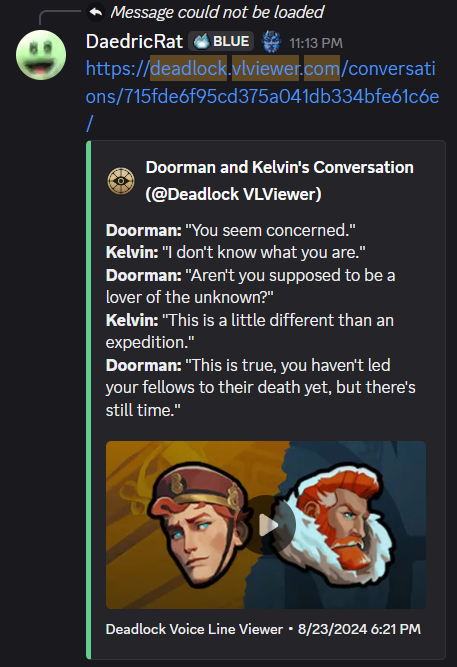
Then Apple users tried to play it.
Making Playback Work on Apple Devices
The videos played with audio on Windows, Linux, and Android, but the same files failed on iOS and macOS. For whatever reason, they didn't like MP3 audio in MP4s. To get them working, I had to convert the audio to a different format. I went with AAC, using its Low Complexity profile. First, I used mpg123-decoder to turn the MP3 into uncompressed PCM samples, then the FFmpeg encoder from @mediabunny/aac-encoder to turn those samples into AAC. Unfortunately, getting those libraries to run in Cloudflare Workers wasn't that simple. The encoder expected to compile WebAssembly from raw bytes at runtime, and the decoder tried to load a Web Worker polyfill that didn't work there. I had to adjust the wrappers to use statically imported WebAssembly modules and skip the incompatible loading code. That got the audio working on Apple devices, but decoding and encoding it took a lot more processing time than just copying the MP3 frames.
| Source audio duration | Direct MP3 packaging | PCM and AAC pipeline | Additional CPU |
|---|---|---|---|
| 3 seconds | 4 ms | 80 ms | 77 ms |
| 8 seconds | 8 ms | 214 ms | 206 ms |
| 16 seconds | 8 ms | 403 ms | 395 ms |
| 30 seconds | 12 ms | 750 ms | 738 ms |
Unfortunately, that extra processing meant I couldn't stay within the free plan's limits. Keeping playable embeds reliable was worth the small monthly cost.
Serving It Like a Normal Video File
Once the audio worked, I still had to deal with how media players requested it. As far as the player was concerned, the URL pointed to a normal video file. It didn't matter that I was generating it on demand. The player might request only part of the video, come back for a different byte range, or send a HEAD request to inspect the response without downloading the body. I needed the endpoint to handle those requests properly rather than always return the whole MP4. For byte ranges, it returns the requested portion with a 206 response, or 416 if the range can't be satisfied. An uncached HEAD request checks that the selected recordings have audio URLs in the catalog without downloading or encoding them. When the finished video is already cached, the response can also include its actual length. The generated video needed to stay consistent between requests, too. In the earlier conversation pipeline, I inserted short pauses between lines so the dialogue didn't run together. Picking new random pauses on every request could produce a different file when another Worker instance generated the same conversation. That would be a problem if the player was requesting different ranges and expecting them to belong to one file. To keep those pauses consistent, I used the audio URLs to seed the random pauses, so the same conversation would always get the same timing while different conversations could still have different pauses. That way, generating the video again wouldn't change the timing halfway through playback.
Impact
To see whether people were sharing the site more, I compared VLViewer links in the official Deadlock Discord before and after the first update with playable embeds.
| Period | VLViewer link occurrences |
|---|---|
| July 21 to August 17, 2026 | 53 |
| August 19 to September 15, 2026 | 161 |
That's 108 additional links, or a 203.8% increase. The last content update had been in February, so people were sharing more of the same voice lines that had already been on the site for months. Previously, people would download a voice line and share the file so others could play it in Discord. Now they could just paste a link, and everyone else could read the line and play it without opening another tab.