I built VLViewer to make game voice lines easier to browse and share, and a big part of that is being able to find a line without listening to every recording. Subtitles let people read through what a character says or search for a particular phrase. Not every game provides them, and the ones that do often have gaps, so I use speech recognition to fill in what's missing. Unfortunately, it doesn't always get the words right. The mistakes bothered people enough that some stopped using the site, while others sent me corrected transcripts that piled up waiting for me to apply them. A few people used GitHub pull requests instead, making their changes easier to review and merge, but that was a lot to ask just to fix a subtitle. I needed a way for people to submit corrections directly on the site.
Deciding What a Correction Should Change
The obvious starting point was a text box next to the transcript, but a correction involves more than a one to one replacement. For example, VLViewer keeps older versions of games, including recordings that have since been replaced or removed. That means a line someone finds in an older version might also exist in the current version under a different filename. A filename can also stay the same while an update replaces its audio with a recording that says something different. Applying a correction by filename alone could miss another copy of the same line or change text that was already right.
To tell those cases apart, I identify recordings using a SHA-256 hash of the audio file's bytes. Renaming a file leaves the hash alone, while changing its contents gives it a different hash. The transcript files can then associate text with specific recordings instead of assuming everything that has ever used a filename says the same thing. A line might also be reprocessed or rerecorded while keeping exactly the same wording. Those files would have different audio hashes, but they can still share a transcript, so a correction can apply to all of them.
In this caption file from Deadlock, announcer/male_patron/patron_male_enemy_astro_killing_streak_medium_01.mp3.json, the official subtitle came from one of these recordings, but merging it with the others applied that text to all three hashes. The first revision keeps a separate recording with different wording. Deadlock's files use internal character names, so astro refers to Holliday and gigawatt refers to Seven.
{
  "schemaVersion": 3,
  "filename": "announcer/male_patron/patron_male_enemy_astro_killing_streak_medium_01.mp3",
  "revisions": [
    {
      "sha256": [
        "80949f6e3af7f7ff01ee5036e8e6eba7ec2caffba798ae6b4d0e5bd9550d864d"
      ],
      "text": "Astro needs to be dealt with.",
      "source": "generated",
      "model": "gpt-4o-mini-transcribe"
    },
    {
      "sha256": [
        "08aa0bd0ac4261737435a88fd642dd7273aafd9a837a6ca8a1c02ce9ed4a6cf6",
        "9f11f7280ae8cf57680b5ba02edd0a47fb7b00f621511880bbb5192c81232345",
        "bb64ccfdf9fa6f197330b119b3c0efb60e64fea5d164c37c9c214102b372cc39"
      ],
      "text": "Holliday will pick us off one by one if we let her.",
      "source": "official"
    }
  ]
}
That tells me which audio I'm dealing with, but I still need to find the other files that might be relevant. The history system, which tracks recordings across game versions, already connects filenames that have shared a recording across official game versions, so I use those connections to build a group called a lineage. Those connections carry through renames, and I can add reviewed connections manually when a rename also changed the audio. Being related doesn't mean all of those recordings should have the same text, though. A line could have been rewritten between versions, and I still want people browsing an older version to read what that older recording actually says.
Editing Related Recordings Together
With those connections in place, I could build the editor around the line someone wanted to fix. Instead of showing only that recording and its transcript, it brings the related recordings together and groups them by their existing text. Someone can listen to the recordings in a group, change the wording, and submit a correction for all of them at once. This keeps a straightforward spelling fix fairly simple, while still showing which recordings the change will affect. If a recording in the group says something different, they can separate it and give it its own wording. Other related recordings might say the same thing but have different generated transcripts, so correcting only one would leave the same mistake elsewhere in the archive. I added a merge action so someone can bring those groups together and give them shared text. I didn't want groups to merge automatically when someone typed matching text, since that also changes which recordings future corrections will affect.
The editor records those choices as operations, such as changing text, merging groups, or separating a recording. That gives the server a way to apply the proposed changes to the original files and check what they do before accepting them. It also means a submission carries the decisions behind the edit, including which recordings should share the corrected transcript.
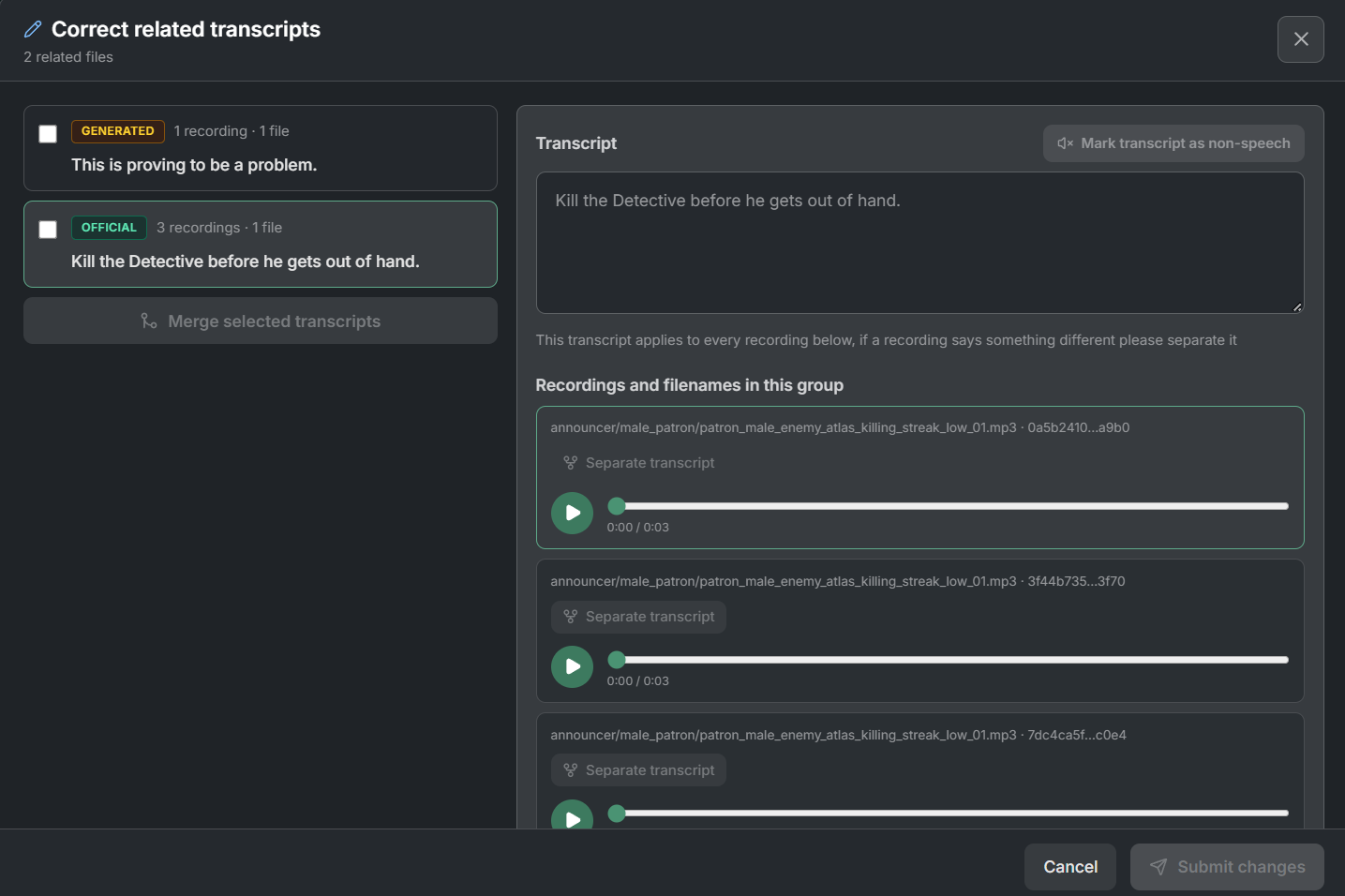
The editor shows the related transcript groups and lets someone listen to the recordings that share each one.
When Official Subtitles Arrive
Community corrections aren't necessarily the last state of a transcript. An older recording might start with speech recognition, get corrected by a contributor, and later have a game update that adds an official subtitle. I wanted to be able to use that official text for the older recording too, without losing the connection the next time I imported game data. Official subtitles take priority over community corrections, which take priority over generated text. People can't edit official wording in the contributor editor, but they can merge related recordings into an official group when they should share that subtitle.
The Deadlock transcripts have an example of this. The files holliday_ping_gigawatt_in_mid.mp3.json and astro_ping_gigawatt_in_mid.mp3.json contain different recordings of "Seven's in mid!" that now share the official subtitle. Copying that text into the older file would make both look correct, but it wouldn't tell the next import that they belonged together. If the official subtitle changed later, the importer could update one file and leave the older recording using the previous wording. I would be back to maintaining separate copies of text that were supposed to stay in sync. To handle that, merging into an official group adds the selected recording hashes to the revision containing the official subtitle. Those hashes also stay in their existing files, so a recording can now appear in both. The official revision supplies the text, and the importer uses the shared hashes to keep the copies updated when that text changes. The older recording still exists under its original filename and game versions, but its subtitle can benefit from the newer official text.
This only makes sense when the recordings should actually share wording. A newer line that says something different gets a separate transcript, even if it replaced the old line in the game. The editor also won't merge conflicting official subtitles by arbitrarily choosing one, and the importer stops before writing transcript output if it receives conflicting official text for a linked group.
Reviewing and Publishing Corrections
Once someone submits their correction, a Cloudflare Worker applies the proposed operations to the current transcript files to check that they work, then stores the proposal in a D1 review queue. I then review it through Transcript Manager, a separate application protected by Cloudflare Access. That keeps reviewer sign-in and publishing tools separate from the public VLViewer site. From there, I can compare the proposed text with what's already in the repository and make further changes before publishing. Those reviewer edits stay separate from the original submission so I can still see what the contributor sent. Once I approve the changes, the Manager can commit them directly to the transcript repository or open a pull request. After they're merged, the content pipeline updates what VLViewer loads without rebuilding the website.
Impact
So far, I've published 974 community submissions covering 968 distinct recordings, before counting the related recordings those changes also reached. Those submissions came from 37 contributor names. It's massively sped up my workflow and made it easier for more people to contribute, whether they're fixing a single word or working through hundreds of lines.